 Liwu
LiwuWhy Your MacBook Charges Past the Limit
Published · Liwu behavior checked against 2.2.5 ()
A charge limit is a target, not a hard ceiling. A MacBook can sit above it because the battery was already higher when you set the limit, because macOS stops within a few percentage points rather than exactly on the number, because macOS occasionally charges to 100% to keep its battery estimate accurate, because a full charge was requested, or because two charging tools are giving different instructions. Most of these need no fix. The rest are settings you can check in a minute.
Verified: Apple documentation and Liwu 2.2.5 behavior checked October 5, 2026.
| What you see | Likely cause | What to do |
|---|---|---|
| A few points above the limit | Documented tolerance | Nothing |
| Still high right after you lowered the limit | The battery was already above it | Use the Mac on battery, or wait |
| 100% once in a while | macOS maintaining its charge estimate | Nothing |
| 100% after you asked for it | Charge to Full Now, or a top-up in your limiter | End it when you are done |
| Past 80% with only Optimized Battery Charging on | It is a delay, not a limit | Set a Charge Limit |
| The limit seems ignored | Two controllers, or the limiter is not in control | Use one controller and check its status |
The battery was already above the limit
Setting a limit tells the Mac where to stop charging. It does not remove charge that is already in the battery. Apple's documentation describes when charging stops and when it resumes; it does not describe draining a battery that is above the limit. Expect the level to come down as you use the Mac on battery power.
Some third-party limiters can discharge while the adapter is connected. In Liwu, targets below 80% and Sailing ranges are held by firmware, which may actively discharge toward the target while plugged in. Without Sailing, targets from 80% to 100% go through the macOS interface, and macOS decides what the battery does.
A few points over is documented behavior
Apple says a Mac using Charge Limit charges to within a few percentage points of the setting, and that charging resumes after the level drops more than 5% while the Mac stays connected to power. A reading of 82% against an 80% limit fits that description. So does a level that drifts down and then climbs back.
macOS occasionally charges to 100%
Apple states that with either Optimized Battery Charging or Charge Limit, a Mac will occasionally charge to 100% to maintain accurate battery state-of-charge estimates. This is part of the built-in feature, not a failure of it.
Liwu's targets from 80% to 100% use the same macOS interface, so the same macOS behavior can apply to them. Liwu sets the target you choose; macOS controls the actual charging.
A full charge was requested
A limit stays out of the way when something asks for 100%:
- Charge to Full Now in the macOS battery menu overrides both Optimized Battery Charging and Charge Limit.
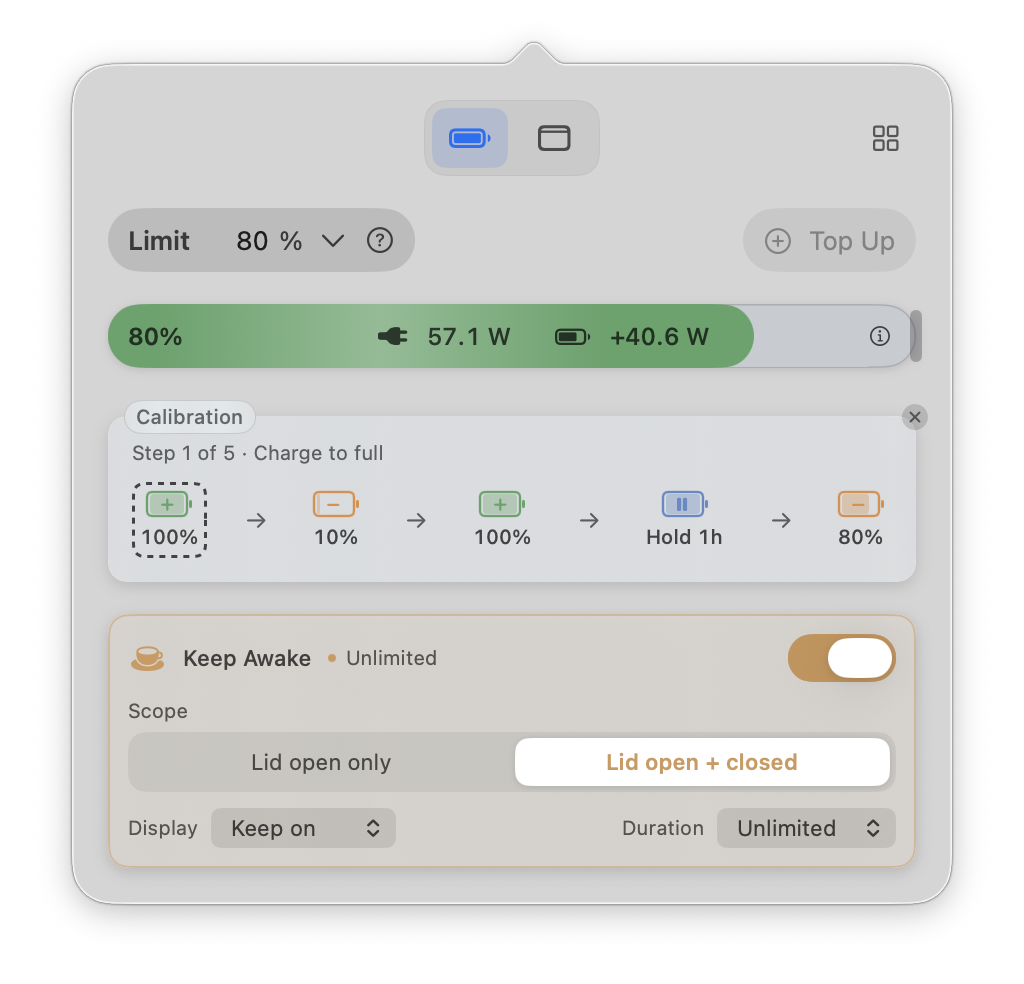
- Top Up in Liwu (Pro) requests 100% while keeping your regular target. It ends when you end it or unplug, and Liwu returns to the latest regular target.
- Calibration in Liwu (Pro) charges to 100% twice and holds there for an hour before it returns to the regular target.
- A target plan in Liwu (Pro) changes the regular target at the time you scheduled, so a plan that raises the target will raise the level.
Optimized Battery Charging is not a limit
Optimized Battery Charging predicts when the Mac will stay plugged in and may delay charging past 80%. It aims to finish charging before it expects you to need a full battery, so reaching 100% is the intended result. If you want the Mac to stop at a number you choose, use Charge Limit on an Apple silicon Mac with macOS Tahoe 26.4 or later, or a third-party limiter. The two built-in options are compared in macOS Optimized Battery Charging and Charge Limit, explained.
Two controllers are giving different instructions
Apple's Charge Limit, Optimized Battery Charging, and a third-party limiter can each decide whether charging starts or stops. When more than one is active, they can issue competing decisions, and the level you see may not match any single setting. Use one controller at a time.
With Liwu:
- Keep Optimized Battery Charging off. Liwu turns it off once at first startup; if you turn it back on in System Settings, Liwu respects that and shows a warning.
- With a target below 80%, a 100% Charge Limit in System Settings is expected. Firmware holds the lower target, so do not lower the system setting to match.
- If the charging configuration differs from what Liwu last recorded, Liwu pauses automatic changes and tells you. Quit any other charging tool, then check the limit in System Settings.
The limiter is not in control
A limit only applies while the tool that set it is still managing charging.
- You quit it. Choosing Quit in Liwu requests release of its charging control: the helper attempts to remove Liwu-owned restrictions and request the native 100% target. Charging to full afterward is the designed result.
- It is not running. Liwu's plans run only while Liwu is running. After a restart, reopen Liwu or turn on Launch Liwu at Login. Until then, the last applied setting remains subject to macOS and firmware behavior.
- The target is not confirmed. A target is a request. Liwu tracks confirmation separately and shows a failed or pending target as failed or pending, not as success.
- Low-target support cannot be confirmed. Liwu offers targets below 80% only after a firmware capability check passes, and it does not treat an earlier pass as permanent. If support cannot be confirmed, new targets are limited to 80–100%. Liwu keeps a saved low target and warns that an earlier restriction may still be active, so read the notice before assuming the low target is or is not in effect.
How a limit behaves during sleep or after shutdown depends on how the tool enforces it, so check the documentation for the one you use. In Liwu 2, the last applied target remains subject to macOS and firmware behavior during sleep, and Liwu checks again on wake. See compatibility and runtime boundaries.
The percentage you see may not be the one being enforced
Liwu's targets below 80% and its Sailing ranges are held by firmware, which may follow a raw capacity estimate rather than the percentage macOS displays. The two can differ by a few points. When they do, Liwu's battery bar shows the raw estimate in parentheses next to the system level, so a displayed 62% against a 60% target can still be a target that is being held.
Check what is happening in Liwu
- Open Liwu from the menu bar.
- Select the small status button next to Limit. The panel states whether the target is confirmed, shows the target Liwu will return to during Top Up or calibration, and lists any warning.
- Read the battery bar. The plug label is adapter input; the battery label is battery power, with + for charging and − for discharging. A connected adapter does not by itself mean the battery is charging.
- If a warning mentions another charging tool or a system setting, follow it before changing the target again.
When to look closer
Investigate when the level keeps climbing well past the limit, no full charge was requested, only one controller is active, and no notice explains it. Start with the basics: confirm the macOS version supports the feature you are relying on, confirm the limiter is running and its target is confirmed, and check whether a plan changed the target.
If the problem is the opposite one, and the Mac stops charging below the level you expect, see why did your Mac stop charging?.
FAQ
Is it a problem if my MacBook reaches 100% now and then?
Apple builds the occasional full charge into both of its charging features. Apple also says a battery's chemical age is affected by factors such as its temperature history and charging pattern. An occasional full charge is one input among several, not a sign that the limit failed.
Why does System Settings show a 100% Charge Limit when my Liwu target is 60%?
That is expected. Targets below 80% are held by firmware, and Liwu manages the system setting needed for that path. Leave it as it is.
Why did my MacBook charge to 100% after I quit Liwu?
Quitting releases Liwu's charging control and requests the native 100% target. Close the window instead if you only want it out of the way; Liwu stays in the menu bar.
Does the limit hold while the Mac is asleep?
It depends on the tool. In Liwu 2, the last applied target remains subject to macOS and firmware behavior during sleep, and Liwu checks again on wake. Liwu 2 does not offer separate charging rules for sleep.
The limit is 80% but the Mac shows 83%. Should I change anything?
No. Apple describes Charge Limit as charging to within a few percentage points of the setting. For how to choose and set the limit itself, see how to limit MacBook charging to 80%.
Sources
- Apple Support: About Optimized Battery Charging and Charge Limit on Mac
- Apple Mac User Guide: If your Mac battery won't charge completely
- Apple Support: About battery health management in Mac laptops with Apple silicon
- Liwu: Compatibility and runtime boundaries
- Liwu: Safety and system access